
Download KeepVault – Reliable Backup Solution, Secure Data Protection
KeepVault is a comprehensive backup application engineered to protect your valuable files from accidental loss, hardware failure, or ransomware attacks. By offering both local storage options—such as internal hard drives, external USB sticks, and network‑attached storage—and remote, real‑time cloud backups on hardened RAID‑6 servers, KeepVault delivers a layered defense strategy that adapts to personal and professional environments. The program runs quietly in the background, automatically syncing according to the schedule you define, while providing instant alerts if a backup fails or if a file needs attention. Whether you are a freelance designer safeguarding project files, a small‑business owner protecting client data, or a home user who simply wants peace of mind, KeepVault combines simplicity with enterprise‑grade security.
Why KeepVault Stands Out: An In‑Depth Overview
When it comes to data protection, many solutions either focus on a single backup method or require complex configuration that deters everyday users. KeepVault bridges that gap by unifying local and cloud backup strategies within a single, intuitive interface. The application starts with a quick onboarding wizard that asks only the essential questions: which folders you want to protect, where you’d like to store the copies, and how often the synchronization should occur. From there, KeepVault handles the heavy lifting—compressing files, encrypting them with AES‑256, and sending them to your chosen destinations without consuming noticeable system resources.
One of the most compelling aspects of KeepVault is its real‑time monitoring engine. As soon as a change is detected—whether you edit a document, add a photo, or delete a file—the engine creates an incremental backup instantly, minimizing data loss windows to seconds. For users who prefer scheduled backups, the application also supports daily, weekly, and monthly routines with flexible start‑time windows to avoid peak usage periods. Additionally, KeepVault integrates with Windows Task Scheduler and macOS LaunchAgents, ensuring that backups can be triggered even before you log in.
Security is baked into every layer of KeepVault. All data transferred to the cloud is encrypted in transit using TLS 1.3, and the stored copies on RAID‑6 servers are encrypted at rest. The application also supports two‑factor authentication (2FA) for the online portal, giving you an extra shield against unauthorized access. Should any issue arise—like a failed backup, insufficient disk space, or network interruption—KeepVault’s notification system instantly pops up a clear, actionable alert, letting you resolve the problem before it escalates.
Key Features That Make KeepVault a Must‑Have Tool
- Hybrid Backup Architecture: Simultaneously store copies locally and on secure RAID‑6 cloud servers.
- Real‑Time Incremental Sync: Changes are captured the moment they happen, reducing data‑loss windows to seconds.
- AES‑256 Encryption & TLS 1.3: End‑to‑end security for both in‑transit and at‑rest data.
- Flexible Scheduling: Choose instant, hourly, daily, weekly, or monthly backup cycles.
- Cross‑Platform Support: Compatible with Windows 10/11, macOS 10.15+, and major Linux distributions.
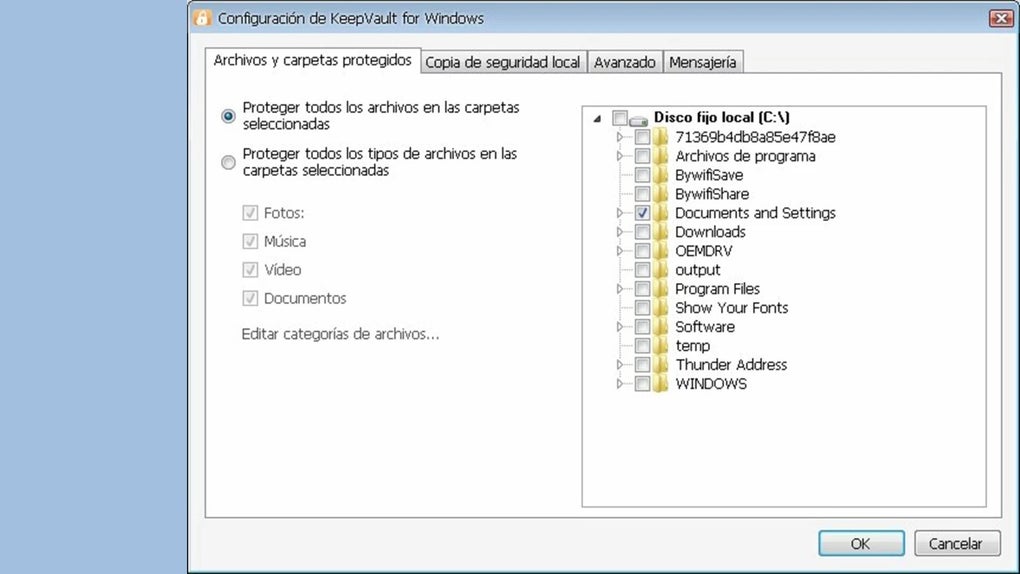
- Granular Folder Selection: Pick individual files, whole directories, or entire drives to protect.
- Version History & Restoration: Access up to 30 previous versions of a file for quick roll‑backs.
- Low System Footprint: Runs as a background service consuming <5 % CPU and minimal RAM.
- Automatic Alert System: Email, desktop, and mobile push notifications for failures or warnings.
- Two‑Factor Authentication (2FA): Optional 2FA for the cloud management console.
Beyond the core backup capabilities, KeepVault also offers a suite of auxiliary tools designed to streamline data management. The built‑in file integrity checker runs periodic hash comparisons to ensure that stored copies remain uncorrupted. A cleanup wizard helps you reclaim space by automatically deleting outdated snapshots based on retention policies you define. For businesses that need compliance reporting, KeepVault can generate audit logs detailing every backup event, user action, and security check, all exportable in CSV or PDF format.
Another hidden gem is the “Smart Bandwidth Throttling” feature. When your internet connection is under heavy load—such as during video calls or large downloads—KeepVault automatically reduces its upload speed, preventing any noticeable impact on your day‑to‑day tasks. Once the network stabilizes, the throttling eases, allowing the backup to resume at full speed. This intelligent adaptation makes KeepVault a courteous neighbor on any network, whether at home or in a corporate office.
Installation, Setup, and Compatibility: Getting KeepVault Up and Running
Installing KeepVault is straightforward and can be completed in under five minutes for most users. The installer is available as a single executable for Windows (.exe), a disk image for macOS (.dmg), and a compressed tarball for Linux (.tar.gz). After downloading the appropriate file from the official website, follow these steps:
- Run the Installer: Double‑click the file and accept the license agreement. The wizard will prompt you to choose an installation directory—default locations are recommended for most users.
- Configure Initial Settings: Upon first launch, KeepVault launches a “Quick Setup” wizard. Here you’ll select the folders you wish to protect, choose a local backup destination (e.g., an external USB drive), and optionally enable cloud backup by logging into your KeepVault account.
- Set Backup Frequency: Choose between “Real‑Time,” “Hourly,” “Daily,” or a custom schedule. For beginners, the default “Real‑Time” option provides the most protection with minimal effort.
- Enable Security Options: Activate AES‑256 encryption, enable TLS 1.3 for cloud transfers, and optionally set up two‑factor authentication through the online portal.
- Finalize and Start Backing Up: Click “Finish” and let KeepVault perform its initial scan. The first backup may take longer depending on the amount of data, but subsequent incremental backups will be near‑instantaneous.
Supported Operating Systems: KeepVault runs natively on Windows 10, Windows 11, macOS 10.15 (Catalina) and later, as well as major Linux distributions such as Ubuntu 20.04+, Fedora 34+, and Debian 10+. The Linux version is distributed as a .deb and .rpm package for easy installation via package managers. System requirements are modest: a 1 GHz processor, 2 GB RAM, and at least 500 MB of free disk space for the application itself.
For users who prefer a portable setup, KeepVault also offers a “USB‑Ready” version that can be run directly from a flash drive without any installation. This is particularly useful for technicians who need to protect data on multiple client machines quickly. The portable edition includes the same encryption and cloud sync features, but stores configuration files locally on the USB device.
After installation, KeepVault integrates with the operating system’s startup routine, ensuring that backups begin automatically each time the computer boots. On Windows, a service called “KeepVault Service” runs in the background; on macOS, a launch daemon named com.keepvault.daemon is created; and on Linux, a systemd unit keepvault.service handles the background process. This seamless integration guarantees continuous protection without manual intervention.
Pros, Cons, and Frequently Asked Questions
Pros
- Hybrid local and cloud backup gives redundancy and fast recovery.
- Real‑time incremental sync minimizes data‑loss windows.
- Strong AES‑256 encryption and TLS 1.3 protect data in transit and at rest.
- Low system resource consumption; runs silently in the background.
- Cross‑platform support for Windows, macOS, and Linux.
- Smart bandwidth throttling prevents network congestion.
- Comprehensive alert system keeps users informed of issues.
- Version history allows easy restoration of previous file states.
- Portable USB version for on‑the‑go protection.
- Free tier available for personal users; paid plans add extra cloud storage.
Cons
- Advanced features like audit logs are limited to paid plans.
- No built‑in file sharing or collaboration tools.
- Initial full backup can be time‑consuming on large data sets.
- Linux installation may require manual dependency resolution for some distributions.
- Cloud storage pricing is tiered; heavy users may incur additional costs.
Frequently Asked Questions (FAQ)
Is KeepVault really free for personal use?
Yes, KeepVault offers a free tier that includes up to 5 GB of cloud storage and unlimited local backups. This is sufficient for most home users who want basic protection for documents, photos, and small media libraries.
How does KeepVault ensure my data is secure in the cloud?
All data uploaded to KeepVault’s cloud servers is encrypted with AES‑256 before leaving your computer. The transmission uses TLS 1.3, and the servers store the encrypted blobs on RAID‑6 arrays, providing both cryptographic and hardware redundancy.
Can I restore a specific version of a file?
Absolutely. KeepVault retains up to 30 historical versions of each backed‑up file. From the restoration UI you can browse the version timeline, preview changes, and restore the exact snapshot you need.
What happens if my internet connection drops during a cloud backup?
KeepVault automatically pauses the upload and resumes when the connection is re‑established. You’ll receive a desktop notification about the interruption, but no data is lost or corrupted.
Does KeepVault support network‑attached storage (NAS) as a backup destination?
Yes, you can add any SMB/CIFS or NFS share as a local backup target. This is ideal for office environments where a central NAS provides fast local recovery while the cloud offers off‑site protection.
Conclusion – Secure Your Data Today with KeepVault
Data loss is a risk that no user should underestimate, and the best defense is a reliable, automated backup solution that works silently in the background. KeepVault delivers precisely that—a hybrid approach that couples fast local restores with robust, encrypted cloud storage on RAID‑6 servers. Its real‑time incremental sync, low resource footprint, and cross‑platform compatibility make it an excellent choice for both tech‑savvy professionals and everyday computer users. While the free tier provides ample protection for most personal scenarios, the paid plans scale gracefully for small businesses needing more cloud capacity and compliance reporting.
If you’re looking for a tool that requires minimal configuration, offers strong security, and keeps you informed with clear notifications, KeepVault checks all the boxes. Download the installer now, run the quick setup wizard, and enjoy the peace of mind that comes from knowing your files are continuously backed up and ready for instant recovery.
Ready to protect your digital life? Click here to download KeepVault and start your free backup journey today.







